
Control the Show
Playback Central
Choose one of these three options for playback, and connect to all controllers in your show.

Dedicated Computer
Use your own personal Windows computer for playback, and connect your controllers through USB adapters or Ethernet.
Expand to high RGB pixel counts with this option, and stretch your budget by using a computer you already own.

The Touch Player
The Touch Player gives you all of the testing & playback control features of a computer, all in a 7" touch screen.
With built in network ports and room to expand, this handheld device can handle your show for years of advanced growth.

Showtime Director & SD Card
Three different size Directors give you flexible options for your show needs. Load the sequences to an SD card and set the schedule.
Directors are perfect for small to medium displays where you don't want to tie up a computer. Pre-made SD cards are available!
Show Control at a Glance
Not sure which show playback option fits your setup? This table covers the key differences across capability, compatibility, and pixel limits so you can match the right device to your display.
| Features & Compatibility | |||
|---|---|---|---|
| Computer | Touch Player | Director | |
|
ELOR Networks |
Up to 16
|
Up to 16
| Up to 4
|
|
Maximum Pixel Control* |
1 Million+
|
1 Million+
| 12,000
|
|
Singing Face Control* |
|||
|
Traditional Light Control* |
|||
|
LOR Mobile App Compatible |
|||
|
Pixielink Compatible |
|||
|
E1.31 / Aurora Core Compatible |
|||
|
Show Playback via SD Card** |
|||
*Can connect to these types of controllers. The playback device itself does not connect directly to strands of lights. |
|||
**Pre-loaded SD cards available! Skip the need to download our software or use a computer to create a playlist. |
|||
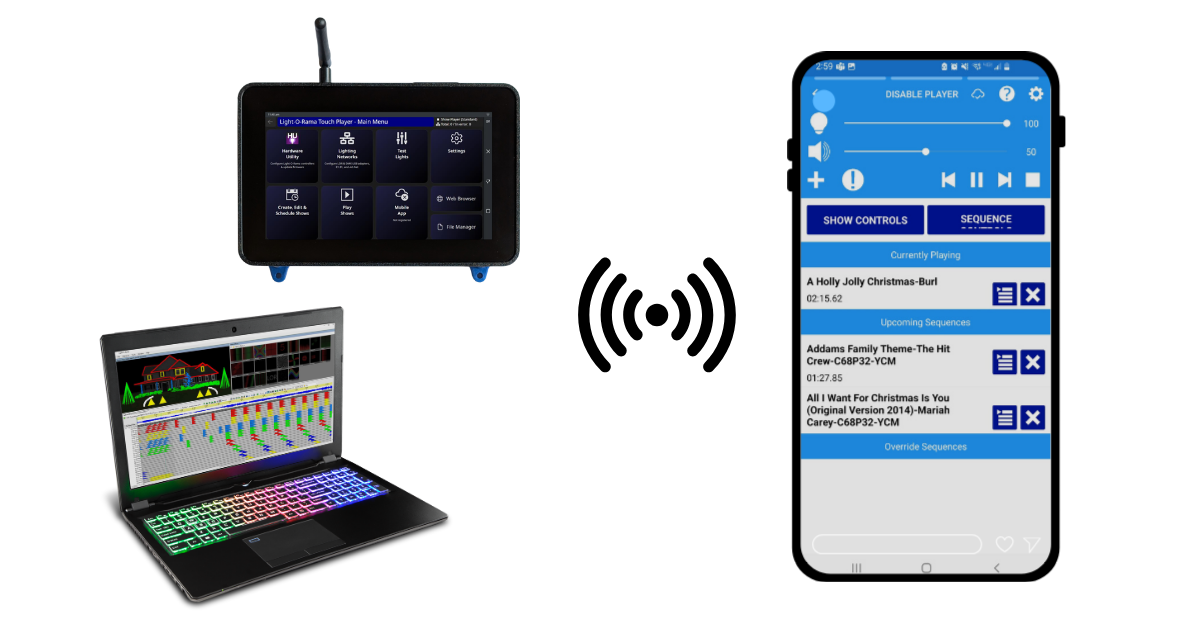
Use the free companion mobile app in LOR S6+ with Computer or Touch Player playback.
- Monitor your show from anywhere
- Test your lights and connections
- Add or remove sequences live
- Start or stop shows on demand
Additional Components
Broadcast Audio
Use an FCC approved FM transmitter to broadcast audio right into the cars of your guests.
Shop NowPixielink Adapter
A key component in using Pixel Bright sequences, and running Pixie controllers at faster speeds.
Shop NowEasy Light Linkers
Wirelessly connect low speed controllers up to 1000 feet away. Perfect for drive throughs.
Shop NowTimecode Sync
Sync up the neighborhood or wirelessly connect networks of smart RGB controllers.
Learn MoreRelated Videos
Hardware Basics
AC vs Pixels. Computer vs. Director. Here's the basics.

Configure Your Networks
The first step to successful playback, defining your networks.

Schedule a Computer Show
Create a new show for computer playback, or to send to a Touch Player.

Build an SD Card
Create an SD card show for playback in less than 5 minutes.