8 Mini Trees - 100 Nodes Each. 80 Nodes for Tree and 20 Nodes for Star. "Pixel Path" for pixel pushing included on the back of each prop. (Ports 1-8; one tree per port)
46" high by 17.5" wide
10mm Green Coro with additional Yellow Coro for Star
8 Mini Arches - 25 Nodes Each (Ports 9-12; two arches per port)
2' 11.5" long by 1' 8.75" high. Lighted length 35". Nodes at 2.125" spacing.
10mm Black Coro
40 Pixel Stakes (also called "Peace Stakes") - 5 Nodes Each. Used to create 4 rows of 10 pixel stakes each. (Ports 13-16; one row of 10 stakes per port)
12" tall with 1.5" spacing
10mm Black Coro
16 Strands of Black Bullet Pixels - 50 Ct (4" spacing). Two strands of 50 should be connected together per Mini Tree prop. LOR connectors.
8 Strands of Black Bullet Pixels - 25 Ct (4" spacing). Two arches should be connected together per Pixie port. LOR connectors.
4 Strands of Black Bullet Pixels - 50 Ct (5 node sections - 3 feet of spacing between each set of 5 nodes.) LOR connectors.
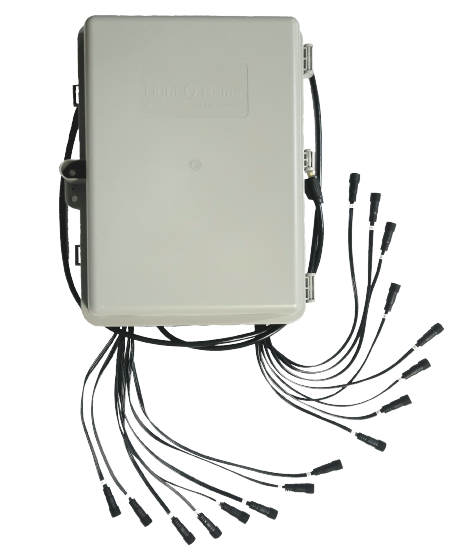
Pixie16 Controller - Assembled -12V - With LOR Dangles Included (Black)
Optional Additions:
LOR Connector Pixel Extension Pack - 4x5ft, 8x15ft, and 8x25ft - Black
Cat5 Cable (50ft)
Not Included:
Mounting material for home attachment
Metal stakes or other ground mounting material
What can your display look like with our CPC Packages? Take a look!
Adding more than 40 Pixel Stakes in your display:
Our default RGBPlus sequences have effects for 40 Pixel stakes.If you do not want to edit the preview/sequences and would prefer that everything just work 'out of the box,'DO NOT order more than one set of 40 pixel stakes with a controller.
If you feel comfortable modifying your custom preview or a copy of the RGBPlus preview (we do not recommend editing the default), you can download one of these prop files and import it instead of the default CPC Pixel Stake Package from the Light-O-Rama Props online menu, then use "Assign Different Preview" to map the RGBPlus sequence to your preview with additional stakes. We do not recommend connecting more than 20 stakes (100 pixels) per pixie port due to the extended wire length of the special pixels made for these stakes - you may see voltage drop if you connect more than 100 pixels.
80 Pixel Stakes - 20 stakes (100 pixels) per controller port. 4 ports of a Pixie used in total.
120 Pixel Stakes - 20 stakes (100 pixels) per controller port (4 needed) on PixieA. 10 stakes (50 pixels) per controller port (4 needed) on PixieB. Default settings for PixieB have the Unit IDs set at 50, 51, 52, and 52 on Aux A. You can change these Unit IDs to a different set of four consecutive numbers if needed. 8 Pixie ports are used in total.
160 Pixel Stakes - 20 stakes (100 pixels) per controller port (4 needed) on PixieA. 20 stakes (100 pixels) per controller port (4 needed) on PixieB. Default settings for PixieB have the Unit IDs set at 50, 51, 52, and 52 on Aux A. You can change these Unit IDs to a different set of four consecutive numbers if needed. 8 Pixie ports are used in total.
Overview
"CPC" Packages include the "Coro, Pixels, and Controller" you need to easily add smart pixel props into to your display. These packages can be connected to an existing network of Gen3 Light-O-Rama Controllers, or used on a separate network within the same show. One Cat5e or Cat6 cable is required per controller to connect to a network. Pixel Extensions are needed to reach from the ports of the controller to the first light on each prop. On average, dangles on Pixie controllers reach 11"-16", and there is 4" of wire from the first pixel on a strand to the connector.
Prop Packages do not include a controller, extensions, or Cat5e cable. Only the coro props and pixels are included. Use these packages to customize your layout/preview and be able to use different controllers, or pack multiple / duplicates of props per controller port. Using software version 6.5.0+ allows for double unit ID mode on Pixies.
CPC Packages and Prop Packages can also be used in a display with custom sequencing, as long as the controller's Unit IDs do not conflict with any other Unit ID assignments on the network. For custom preview inspiration, check out our free Compact Layouts.
Network limits and playback speed are important components of designing a light show. Ensure you understand the requirements and benefits of ELOR, DMX, and E1.31 before choosing to use the default layout, or customizing your own.
Software is not included with this purchase. A free Basic license can control up to 680 pixels. A Pro license unlocks full pixel and traditional LED control. Version S6.2.0+ is recommended for easiest use when creating your own sequences; buffer rows are available as new Motion Effect Row types in S6.5.0+ for even more advanced effect options.
CPC Packages are NOT compatible with Traditional Layout Sequences. The only pixel effects in the Deluxe Layout (SD Card) are for a 16x25 Tree, 16x50 Tree, and 4 Legacy V1 Singing Trees.
Coro props are sold separately only through custom orders. Please contact our help desk for pricing.
Prop Assembly
Pixels are not pre-pushed into these props. Assembly is to be completed by the customer. A Quick Guide of specific instructions is included with each CPC package. In general, props should be arranged left to right or top to bottom when viewed as the audience to best match pre-programmed sequencing effects.
When viewing a 10mm coro prop from the back, locate the "star" in the silver or black pixel path as the "start" of pushing your pixels. The side of the pixels with the male end (the 3 prongs) is the starting side of the strand. Follow the pixel path until you reach the "square" for "stop."
For single line props (arches, rooflines, windows), the pixels should be pushed right to left when viewing the prop from the back. (Left to right viewing as the audience). The Quick Guide instructions will tell you if your prop uses 25, 50, 100, or 150 pixels per port of your controller.
Mount the props to your home or in your yard using standard ground stakes, zip ties, PVC or other mounting material of your choice. Mounting material is not included with this package unless specifically stated.
Pushing a prop backwards will cause it to be non-usable with pre-programmed sequences.
Using RGBPlus Sequences
Using CPC Packages with RGBPlus Sequences requires version S6.2.0+ Pro.
A Computer, Touch Player, or N4-G4-Director can be used for playback.
Default RGBPlus sequences contain effects for Traditional Lights, Singing Trees or Pumpkins, and ~6500 pixels, organized into 4 ELOR Networks.
Light-O-Rama prop effects included in RGBPlus Christmas sequences:
4×
16 Channel AC Controllers
4×
AC Strobe Channels
8×
RGB 10W Floods
8×
RGB 50W Floods
4×
RGB Singing Trees
1×
RGB Tree 16×25
1×
RGB Star Topper for 16×25 Tree
1×
RGB Tree 16×50
1×
RGB Star Topper for 16×50 Tree
1×
RGB Tree 32×50
1×
RGB Star Topper for 32×50 Tree
1×
RGB 20×40 Matrix
4×
RGB Roofline Segments
4×
RGB Windows / Frames
40×
RGB Pixel Stakes
8×
RGB Mini Arches
4×
RGB Snowflakes
4×
RGB Spinners
4×
RGB Candy Canes
8×
RGB Mini Trees
Light-O-Rama prop effects included in RGBPlus Halloween sequences:
4×
16 Channel AC Controller
4×
AC Strobe Channels
8×
RGB 10W Floods
8×
RGB 50W Floods
4x
RGB Singing Pumpkins
1×
RGB Tree 16×25
1×
RGB Star Topper for 16×25 Tree
1×
RGB Tree 16×50
1×
RGB Star Topper for 16×50 Tree
1×
RGB Tree 32×50
1×
RGB Star Topper for 32×50 Tree
1×
RGB 20×40 Matrix
4×
RGB Roofline Segments
4×
RGB Windows / Frames
40×
RGB Pixel Stakes
8×
RGB Mini Arches
4×
RGB Bats
4×
RGB Spiders
4×
RGB Ghosts
8×
RGB Tombstones
Using Pixel Bright Sequences
To use the full Pixel Bright Layout, a high speed Pixielink adapter with your Pixies (or Aurora Core Controller/s instead of Pixies) is strongly recommended for best performance and playback. Default Pixel Bright Sequences are configured for 1 ELOR Network (for Traditional Lights and Singing Faces), and span 174 DMX universes (~17,700 pixels) for all other included CPC Packages.
The default layout is designed to be used primarily with Pixies and a Pixielink, via a Computer or Touch Player for playback. To use a modified version of Pixel Bright on an ELOR network or with a Showtime Director, create your own custom preview using our software, or download one of our free Compact Previews.
Light-O-Rama prop effects included in Pixel Bright Christmas sequences:
4×
16 Channel AC Controllers
8×
RGB 10W Floods
8×
RGB 50W Floods
4×
RGB Singing Trees
4×
RGB Singing Bulbs
1×
RGB 32×50 Singing Matrix
1×
RGB Tree 16×25
1×
RGB Star Topper for 16×25 Tree
1×
RGB Tree 16×50
1×
RGB Star Topper for 16×50 Tree
1×
RGB Tree 32×50
1×
RGB Star Topper for 32×50 Tree
1×
RGB 20×40 Matrix
4×
RGB Roofline Segments
4×
RGB Windows / Frames
40×
RGB Pixel Stakes
8×
RGB Mini Arches
4×
RGB Large Arches
4×
RGB Snowflakes
4×
RGB Spinners
8×
RGB Candy Canes
8×
RGB Mini Trees
4×
RGB Lollipops
8×
RGB Wrapped Candies
8×
RGB Presents
8×
RGB Ornaments
8×
RGB Verticals / Columns
2×
RGB Crystal Snowflakes
1×
RGB Diamond Mandala
1×
RGB 96×50 Matrix
Assembled Pixie controllers are included with CPC Packages. Controllers are not included with Prop Packages. An Assembled Pixie controller includes the controller board and power supply wired and mounted in a weather-proof, ventilated and UL listed enclosure. This is a 12 Volt controller system compatible with 12V RGB smart pixel strands and devices. Dumb RGB devices or standard LED / Incandescent lights cannot be plugged into the ports of this controller.
Pixie power supplies are UL Listed:
Pixie4 = MeanWell LRS-150-12 - 120/240V input (User Selectable) - 12V - 12.5A output - with extended temperature operating range.
Pixie8 = MeanWell LRS-350-12 - 120/240V input (User Selectable) - 12V - 29A output - with extended temperature operating range.
A Quick Guide will arrive with your CPC Package purchase. View the expanded manual for the Pixie Controller by clicking here.
Pixie4 Dimensions:
Enclosure Dimensions Outer = 11.85" x 8.5" x 4.25" Enclosure Dimensions Inner = 9" x 6.15" x 3.5"
Dangle length (if included): 10.5" to 16" each (4 Total) Power Cord: 57 1/2"
Pixie8 Dimensions:
Enclosure Dimensions Outer = 13.75" x 11.75" x 5.5" Enclosure Dimensions Inner = 10.25" x 8.75" x 4.5"
Dangle length (if included): 11" to 17" each (8 Total) Power Cord: 68 1/2"
Pixie16 Dimensions:
Enclosure Dimensions Outer = 15.25" x 12.5" x 6" Enclosure Dimensions Inner = 14" x 10.25" x 5.25"
Dangle length beyond enclosure (if included):varies 5" to 11" Power Cord: 66"
Purchases outside the United States and Canada are assembled with an internationally approved and UL listed MeanWell RSP-150-12, RSP-320-12, or RSP-500-12V - 120/240V input - 12V - 12.5A output - with Power Factor Correction and extended temperature operating range.